My students do a technology center each day for reading and math. So far this year, they’ve worked on Study Island, Front Row, and Epic for reading. They enjoy parts of all of those programs, and I love the data I collect from them. Last week, we added a new program to our technology center: Reading Eggspress. Find out why it quickly became a favorite for my students.

**This post contains affiliate links and I will be compensated if you make a purchase after clicking on my links. I only recommend products that I use and love.
Reading Practice
With only a few weeks left before state testing, I wanted to find some additional reading practice for my students. Our CDTs, the assessment we use to measure student growth, showed that many of my students need practice with vocabulary. I wanted to find a program that had a strong emphasis on vocabulary while still practicing other reading skills.
That’s when I found Reading Eggspress. There was a one month free trial, so I signed up for it. I added my class and printed their usernames and passwords. What did I have to lose? I would just cancel at the end of the month if we didn’t like it.
Trying Out Reading Eggspress
When I first arrived at the Reading Eggspress website, I saw that there are 2 separate programs. Reading Eggs is for ages 4-7, and Reading Eggspress is for ages 7-13. There is even a Reading Eggs Junior for ages 2-4.
When I signed my class up for Reading Eggspress, I took a few minutes to play around with it. I worked through a lesson, and I loved how much vocabulary was a part of the program. Looking up words in the dictionary, parts of speech, and correct word meaning were all practiced. Plus, I read several passages and answered questions just like the ones on the state tests. It was fun for me, but I wasn’t sure what my students would think.
At the beginning of our technology center on Monday, I gave the students their Reading Eggspress usernames and passwords. I told them to just experiment with it and see what they could do. When their 20-minute center came to an end, they begged to be able to continue playing. I had no idea they would love it that much!
How Does Reading Eggspress Work?
When your students first sign into Reading Eggspress, they will see the student dashboard. They can choose an activity as long as you haven’t created an assignment. I’ll tell you more about that in a minute.
Parts of the Student Dashboard
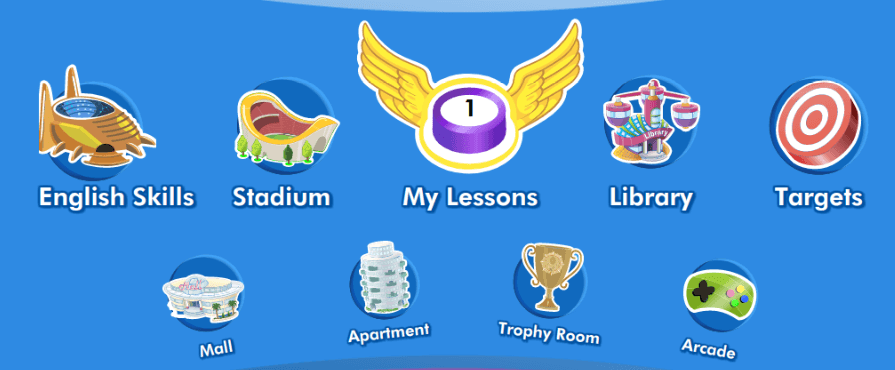
Reading Activities
- My Lessons – My Lessons is in the center of the student dashboard. When students click on it, they will start by taking a pretest. That will help to differentiate their lessons so all of your students are working at their own level. They will move through levels like a board game. Every lesson requires the students to read passages, answer comprehension questions, and practice vocabulary skills.
- English Skills – The English Skills section has spelling practice. My third graders can choose a third-grade level spelling pattern to practice. They have to choose the word that is spelled correctly and type the correct spelling of words. My school district doesn’t have a spelling program, so I love this feature!
- The Stadium – My students absolutely love The Stadium! They can play reading games against their classmates, other students in the school, and other students in the world. My students get very excited when they’re playing against each other, and they can get loud. Our reading center time is silent, so I had to ban The Stadium during center time. Instead, on days when we get through all our lessons without too much talking, we take 10 minutes at the end of the day for The Stadium.
- Library – The library is filled with thousands of books in all genres. The students can choose a book to read. When they’re finished, they take a quiz to check their reading comprehension. My students love the book selection, and they’ve all found books they love.
- Targets – The Targets section sets goals for your students. It challenges them to complete tasks to move up to the next level.
As the students complete activities and answer questions correctly, they earn eggs. They can spend the eggs at the bottom of the dashboard. Here are the different parts:
- Mall – The students can spend their eggs to buy a household items, features for their avatars, pets, and trading cards at the mall. The cash register tells the students how much each item costs. They can see if they have enough eggs to purchase things. My students love shopping for new items at the mall.
- Apartment – The apartment is where students can display items they purchased at the mall. They can move things around and even paint the walls.
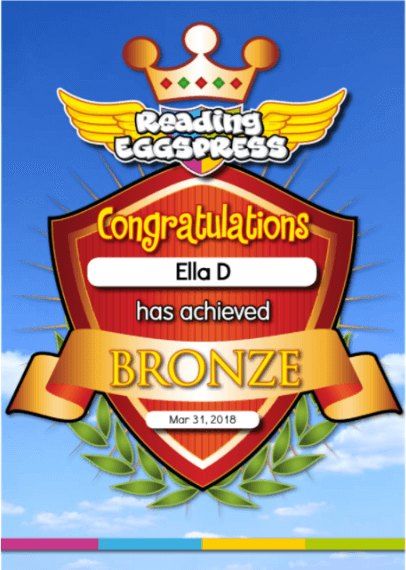
- Trophy Room – The students can visit the trophy room to see how many trophies they’ve earned. It also shows them how to earn trophies. As your students earn trophies, they get certificates, too. Two of my students just got their first certificates today. The rest of the class is now more motivated than ever to earn eggs.
- Arcade – For your students who aren’t interested in shopping for items at the mall, there’s the arcade. They can spend their eggs to play arcade games. The great thing is that the arcade games continue to practice reading and spelling skills.
Teacher Features
As much as my students like Reading Eggspress, I think I may like it even more than them. The teacher dashboard has just as many amazing features as the student dashboard. Let’s take a peek.
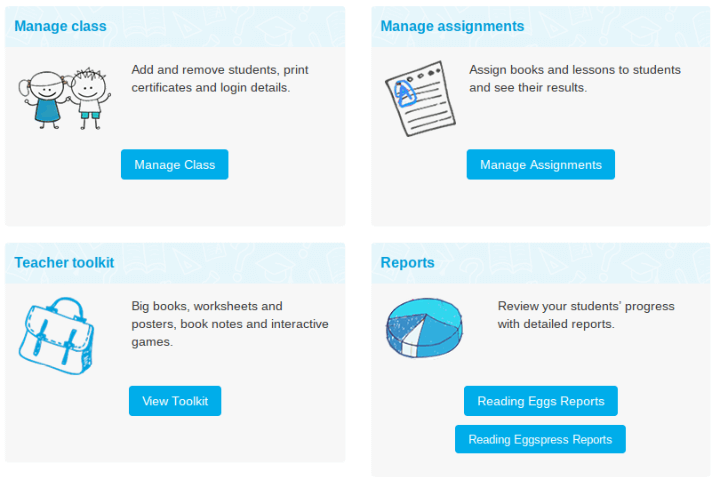
- Manage Class – In the manage class area, you can add and remove students. You can also print their usernames, passwords, and certificates. One of my favorite features is the ability to turn off the games and playing features so the students have to focus on the lessons.
- Manage Assignments – As the name suggests, you can create assignments for your students in this section. You can also view the results of previous assignments. Each assignment includes a book to read, a comprehension quiz, and vocabulary practice. It ends with another passage and a quiz. The students can’t finish the assignment until they have passed the quiz. When you’re looking at the results, you can see how many times each student took the quiz and their score. Another feature I love is that you don’t have to give all your students the same assignment. That is great for differentiation, because you can give students who are reading below grade level a first or second grade passage.

- Teacher Toolkit – This section has additional resources for teachers. I haven’t had a chance to explore it too much, but there are student worksheets for spelling and phonics. There are also Powerpoints to help teach some skills.
- Reports – This is another section I want to explore more. It gives an overview of how your whole class is doing in each area. You can also narrow it down to individual students.
Want to Try Reading Eggspress?
When I was searching for vocabulary practice, I never guessed I would find a program my students would love this much! I called yesterday to find out pricing. It works out to about $8 per student. I think that’s a great deal for a program that engages my students this much and gives me valuable data. Next year, I’m going to spend the money my home school association gives me on this program instead of organizational supplies.
Do you want to try Reading Eggspress in your classroom? Just visit the Reading Eggspress website, and sign up for your 1 month free trial today.
You’re Invited!
Looking for ways to differentiate your lessons and meet the needs of all your students without adding more to your plate?
Join The Differentiation Conversation Community, a free community for elementary teachers where we share practical differentiation strategies, ready-to-use resources, and encouragement to help you meet the needs of all your learners.
What Do You Think?
Do your students love Reading Eggspress as much as mine do?
Let me know in the comments below.
If you enjoyed this post and think your teacher friends will, too, please click the button to share it on your favorite social media platform.

Leave a Reply